Where to Find Agentic Storefronts in Shopify Admin — and What the Page Actually Shows


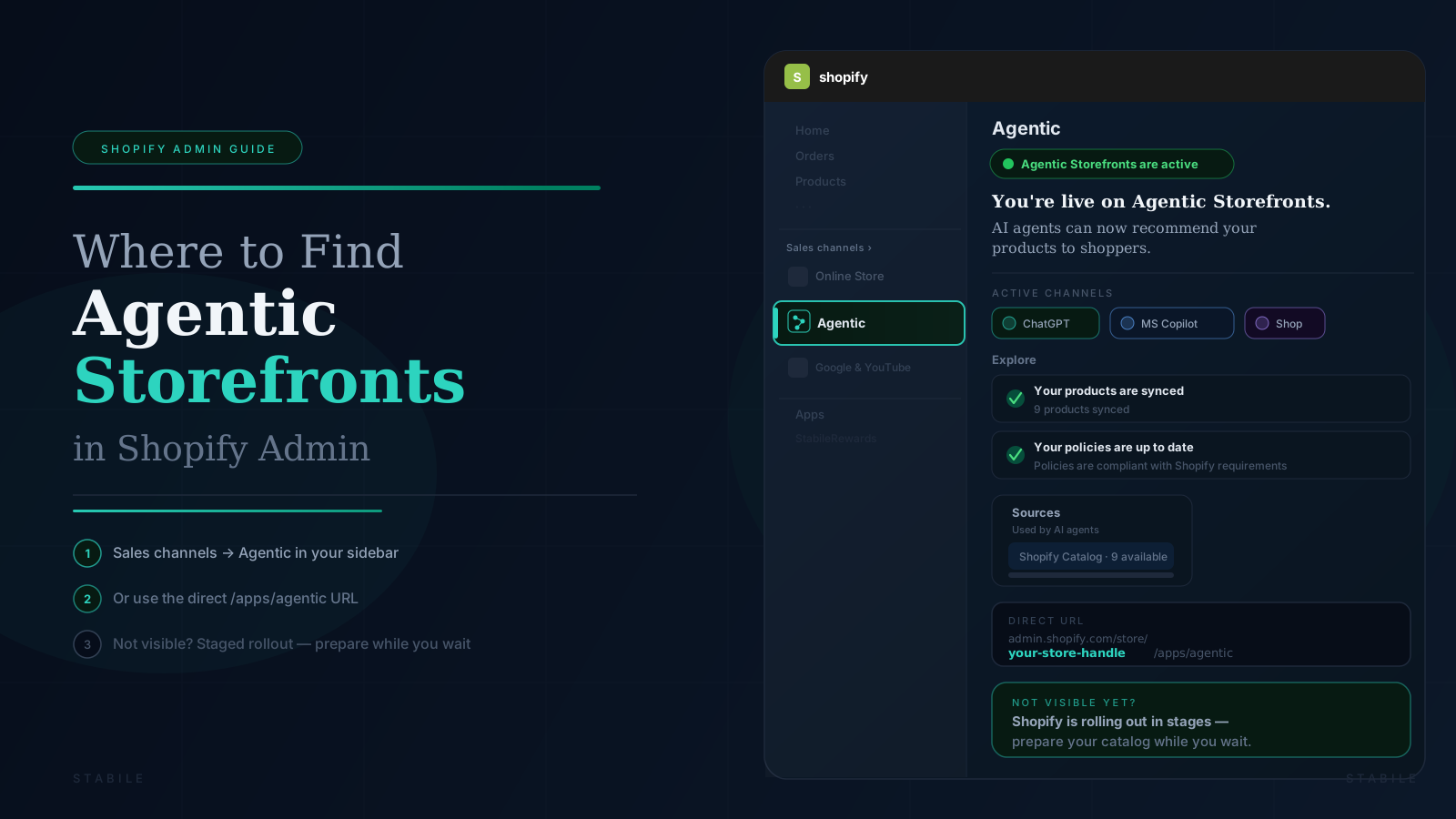
Direct Answer: To find Agentic Storefronts in Shopify Admin, look under Sales channels in the left sidebar. If it has rolled out to your store, you will see Agentic listed there. You can also navigate directly to
https://admin.shopify.com/store/YOUR-STORE-HANDLE/apps/agentic— replaceYOUR-STORE-HANDLEwith the subdomain portion of your myshopify domain before.myshopify.com. If Agentic does not appear in either place, Shopify has not yet provisioned it for your store. This is a staged rollout and its absence does not indicate a problem with your store or any app you are using.
A merchant using the StabileRewards AI Shopping Readiness Check recently sent us a message that we have now heard from several store owners:
"I checked the Agentic Storefronts status item in the AI Shopping Readiness Check, but I do not see Agentic under Sales channels in my Shopify Admin left sidebar. Please help me confirm whether my store has rollout access."
It is a reasonable question — and the confusion is understandable. Stabile flags Agentic Storefronts as a manual check because Shopify does not expose its rollout status through a public API. Rather than showing an inaccurate automatic result, we link merchants directly to the Agentic page so they can check for themselves.
This post explains exactly how to find it, what you are looking at when it is active, and what to do if it has not reached your store yet.
What Is Agentic Storefronts?
Shopify Agentic Storefronts is Shopify's infrastructure for making your product catalog discoverable in AI shopping experiences — ChatGPT, Microsoft Copilot, Google AI Mode, Gemini, and the Shop app.
When it is active for your store, AI agents can recommend your products to shoppers in real-time conversations. Orders that come in through these channels flow back into Shopify with full AI channel attribution — you can see exactly which AI platform drove each sale.
It is managed entirely from Shopify Admin. No separate app installation is required for the discovery layer.
How to Find Agentic Storefronts in Shopify Admin
Option 1 — Look in the Left Sidebar
Open your Shopify Admin and look at the left navigation panel.
Under Sales channels, check whether you see Agentic listed. It will appear alongside your other channels (such as Online Store and Google & YouTube) if it has been provisioned for your store.
Click Agentic to open the page.
Option 2 — Navigate Directly by URL
You can go to the Agentic page directly. While logged in to Shopify Admin, open this URL:
https://admin.shopify.com/store/YOUR-STORE-HANDLE/apps/agentic
Your store handle is the subdomain portion of your myshopify domain — everything before .myshopify.com.
Example: If your myshopify domain is example-store.myshopify.com, your store handle is example-store, and the direct URL is:
https://admin.shopify.com/store/example-store/apps/agentic
If you see a redirect after opening the URL, that is normal. Shopify may redirect from
/agenticto/apps/agenticor vice versa depending on how your store is configured. Follow the redirect — it still lands on the right page.
What You Will See When Agentic Storefronts Is Active
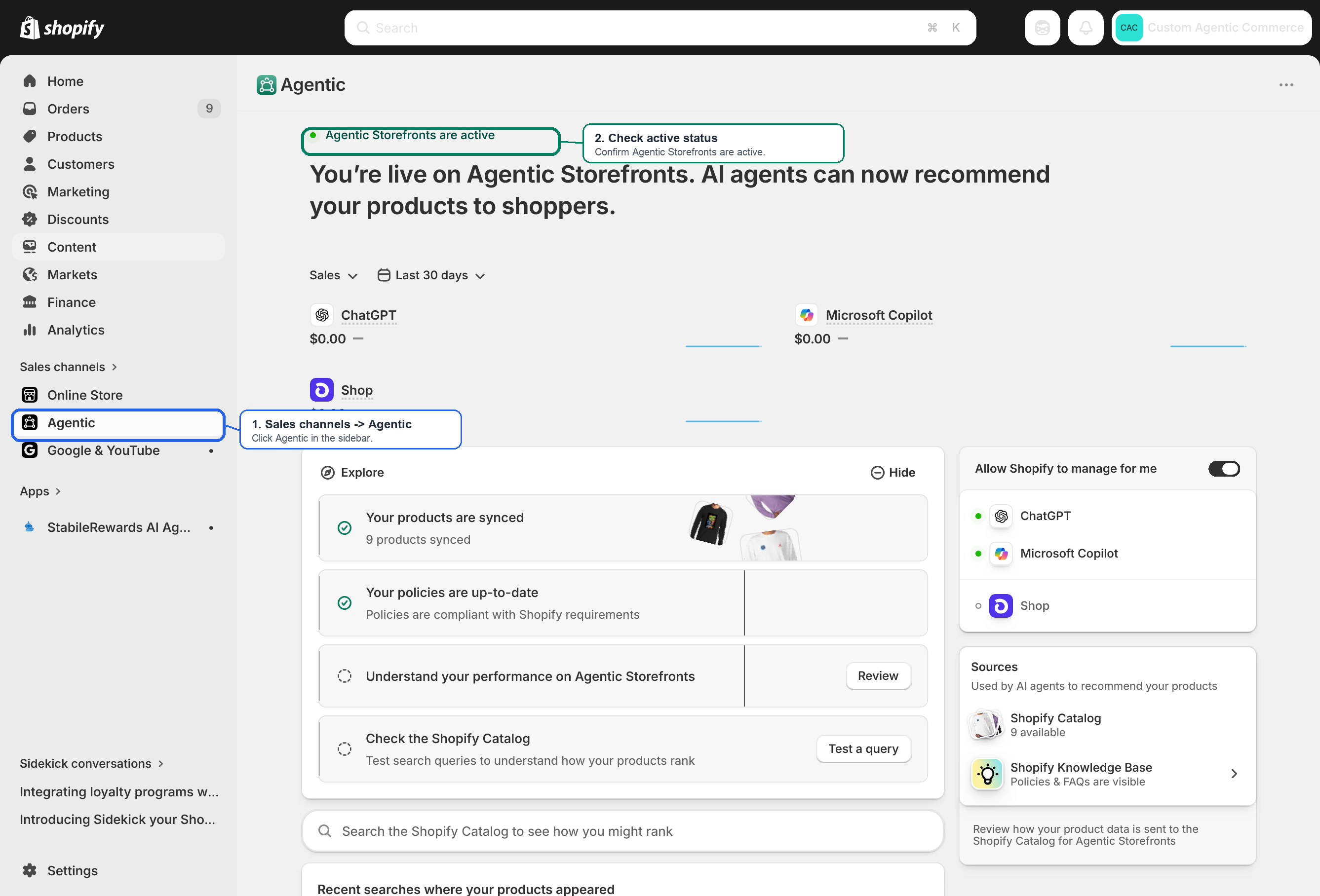
If Agentic Storefronts has rolled out to your store and is enabled, the page opens with a status message at the top:
Below that, the page is organized into several sections.
AI Channel Sales Summary
A sales panel shows performance broken down by AI channel for the selected date range (default: last 30 days):
- ChatGPT — orders attributed to ChatGPT shopping flows
- Microsoft Copilot — orders from Copilot-assisted shopping
- Shop — orders via the Shop app
At launch, most stores will see $0.00 across all channels. That is expected — the channels are live and your products are discoverable, but AI shopping volume grows over time as more buyers use these tools.
Explore Panel
This panel walks you through your readiness status with four items:
- Your products are synced — confirms how many products are in the Shopify Catalog available to AI agents
- Your policies are up to date — confirms your store policies meet Shopify's requirements for Agentic Storefronts
- Understand your performance on Agentic Storefronts — links to performance analytics
- Check the Shopify Catalog — a live search tool that lets you test queries and see how your products rank
The Shopify Catalog search tool is one of the most useful things on this page. Type a buyer query — for example, "men's stretch boxer shorts" — and see whether your products surface for it and how they appear. The page also shows Recent searches where your products appeared, giving you a window into what real AI shopping queries are already matching your catalog.
Sources Panel
The right side of the page shows what AI agents are drawing on to recommend your products:
- Shopify Catalog — your synced product data, with a count of available products
- Shopify Knowledge Base — your store policies and FAQ content, visible to AI agents when buyers ask questions about your store
Channel Status
Also on the right side, you will see which AI channels are active for your store:
- A green dot next to a channel (ChatGPT, Microsoft Copilot) means it is live and connected
- An open circle next to a channel (Shop) means setup may still be pending or the channel is not yet fully active
The "Allow Shopify to manage for me" toggle appears in this panel. When enabled, Shopify can automatically connect your store to new Agentic channels as they become available — without requiring manual action from you for each one.
What If You Do Not See Agentic in the Sidebar?
If Agentic does not appear under Sales channels, there are a few likely explanations.
Shopify has not provisioned it for your store yet. Agentic Storefronts is rolling out in stages. Not every store has access at the same time, and Shopify has not published a timeline or full eligibility list. This is the most common reason.
Your account permissions may limit what you see. If you are not the store owner, try asking the owner or an admin with full permissions to check. Some sales channel visibility depends on staff role.
Your store setup or region may affect eligibility. Shopify has not made its eligibility criteria fully public. Plan, region, and store configuration may all be factors.
To test directly: Navigate to
https://admin.shopify.com/store/YOUR-STORE-HANDLE/apps/agenticwhile logged in as the store owner. If the Agentic page loads, your store has access. If you land on a "page not found" screen or are redirected to the Admin home, Agentic Storefronts has not yet been provisioned for your store.
How to Prepare While You Wait
If Agentic Storefronts is not visible yet, use the time to get your store ready for when it arrives.
AI shopping systems are selective. A catalog with thin descriptions, missing policies, or unclear pricing is less likely to earn confident recommendations from AI agents — even after the channel is technically enabled.
Catalog basics:
- Write product titles the way a buyer would ask for the product, not the way a warehouse would catalog it
- Add complete descriptions with use-case language, not just specifications
- Make sure pricing, inventory, and storefront URLs are accurate and up to date
- Use high-quality product images
Policy coverage:
- Returns and refund policy
- Privacy policy
- Terms of service
- Shipping information and timelines
Storefront access:
- Remove storefront password protection if you want public AI discovery
- Make sure active products are published and available to relevant sales channels
Shopify Knowledge Base visibility:
A well-written FAQ page is one of the most underrated AI commerce assets available to any Shopify merchant. AI shopping agents pull answers directly from FAQ pages when buyers ask questions about your store — "does this store ship internationally?" or "what is the return window?" — before a product recommendation is ever made. Your FAQ is effectively a brief you hand to every AI that considers recommending you. If your store does not have one, this is a good time to build it.
Why StabileRewards Shows This as a Manual Check
The StabileRewards AI Shopping Readiness Check includes an Agentic Storefronts status item. It appears as a manual check rather than an automatic pass or fail — and the reason is straightforward.
Shopify's rollout status for Agentic Storefronts is not available through a clearly documented public API. Stabile can read your product data, policy coverage, pricing, and storefront access automatically. It cannot read whether Shopify has internally provisioned the Agentic channel for your specific store.
So instead of showing an inaccurate result, Stabile links you to the Agentic page in your Admin and asks you to confirm the status yourself.
If Agentic is active, you have confirmed the channel is live. If it is not available yet, there is nothing to fix — the check is informational, not a penalty.
Once Agentic Storefronts Is Active: The Gap Most Merchants Miss
Getting onto Agentic Storefronts solves the discoverability layer — your products are now findable by AI agents.
But two gaps remain that most stores do not address.
Gap 1 — Your loyalty program is invisible to AI agents at the moment of decision
When a buyer asks ChatGPT to find a product, the agent picks based on price, availability, and catalog clarity. It does not know the buyer already has reward points with your store. It does not know a purchase with you would bring them closer to unlocking something.
A loyalty signal that AI can see — before the order is placed — turns a tie between your store and a competitor into a preference. This is exactly what the StabileRewards More AI Sales feature is built for.
Gap 2 — AI-referred customers skip your storefront entirely
Buyers who arrive through ChatGPT or Copilot go straight to checkout. They never browse your store. They never see a points banner, a reward popup, or a "you'll earn 500 points on this order" message.
If your loyalty program fires only on storefront sessions, these customers earn nothing — and have no reason to come back.
StabileRewards works at the order level. It reads Shopify's AI channel attribution on every order and applies your reward rules automatically, without requiring a storefront session. Post-purchase reward notifications go out by email, so AI-referred customers know they earned something even though they never visited your store directly.
Quick Reference
To find the Agentic page:
- Open Shopify Admin
- Look under Sales channels in the left sidebar → check for Agentic
- Or navigate directly:
https://admin.shopify.com/store/YOUR-STORE-HANDLE/apps/agentic
To confirm it is active: Look for the green dot and "Agentic Storefronts are active" message at the top of the page.
If it is not there yet: Shopify has not rolled out Agentic Storefronts to your store yet. Keep your catalog, policies, and product content in good shape in the meantime.
Frequently Asked Questions
How do I find Agentic Storefronts in Shopify Admin?
Look under Sales channels in the left sidebar. If your store has access, you will see Agentic listed there. You can also go directly to https://admin.shopify.com/store/YOUR-STORE-HANDLE/apps/agentic while logged in as the store owner — replace YOUR-STORE-HANDLE with the subdomain portion of your myshopify domain before .myshopify.com.
What does "Agentic Storefronts are active" mean? Your store's product catalog is now discoverable in supported AI shopping experiences, including ChatGPT, Microsoft Copilot, and the Shop app. AI agents can recommend your products to shoppers, and in supported flows can assist with checkout. Orders from these channels flow into Shopify with AI channel attribution so you can see which platform drove each sale.
What AI channels are included in Shopify Agentic Storefronts? At launch, the primary channels are ChatGPT, Microsoft Copilot, and Shop. Google AI Mode and Gemini are part of Shopify's broader Agentic Commerce direction. Channel availability can vary by store and region.
What if I don't see Agentic under Sales channels? It most likely means Shopify has not yet provisioned Agentic Storefronts for your store. This is a staged rollout — absence does not mean something is wrong. Navigate directly to the Agentic URL while logged in as the store owner. If the page loads, you have access. If you see "page not found" or are redirected to Admin home, the rollout has not reached your store yet.
Do I need to do anything to go live on Agentic Storefronts? For eligible stores, Agentic Storefronts is designed to be active by default — Shopify syncs your product catalog automatically. The Agentic page in your Admin shows your sync status and flags any issues to address. For individual channels like Shop, you may need to complete additional setup steps to reach fully active status.
What is the Shopify Catalog and how does it relate to Agentic Storefronts? The Shopify Catalog is the product data layer AI agents use to find and recommend your products. When your catalog is synced — confirmed by the "Your products are synced" status on the Agentic page — your products are available across AI channels connected to Agentic Storefronts. The Shopify Knowledge Base (your policies and FAQs) is a separate source that AI agents draw on for store-level information like shipping timelines, return windows, and policies.
What is the "Allow Shopify to manage for me" toggle? This setting lets Shopify automatically configure your store for new Agentic channels as they launch. With it enabled, when Shopify adds a new AI shopping platform to Agentic Storefronts, your store is connected without requiring you to take manual action for each one.
Why does the StabileRewards readiness check show Agentic Storefronts as a manual check? Shopify's internal rollout status for Agentic Storefronts is not exposed through a public API. Stabile cannot read whether Shopify has provisioned the Agentic channel for your specific store automatically. Rather than show an inaccurate result, Stabile links you directly to the Agentic page in Shopify Admin so you can confirm the status yourself.
What happens to loyalty rewards for orders that come in through Agentic Storefronts? Most loyalty apps rely on storefront sessions — page views, logged-in user detection, and on-site triggers. Buyers who come through AI channels skip the storefront and go directly to checkout, so session-based loyalty systems typically do not fire for these orders. StabileRewards works at the order level instead, reading Shopify's AI channel attribution data and applying your reward rules automatically regardless of how the buyer arrived.
Get started
Add loyalty to every AI-channel order — automatically. StabileRewards reads Shopify's AI channel attribution on every order and rewards customers who came through ChatGPT, Microsoft Copilot, Gemini, and other AI channels — no storefront session required. Setup takes under 5 minutes and layers on top of your existing store without disrupting anything.
Two plans:
- Free to install — pay on results only: 1% of reward value redeemed + $0.05 per AI-channel transaction. No upfront cost, no charge if no rewards are applied.
- Loyalty Copilot — $5.99/month (or $59.99/year, saving 17%) with a 30-day free trial. Flat-rate access to all features including Gemini tracking and revenue insights by AI platform.