Your robots.txt Is Perfect. Your Shopify Store Is Still Invisible to AI Shopping Assistants.

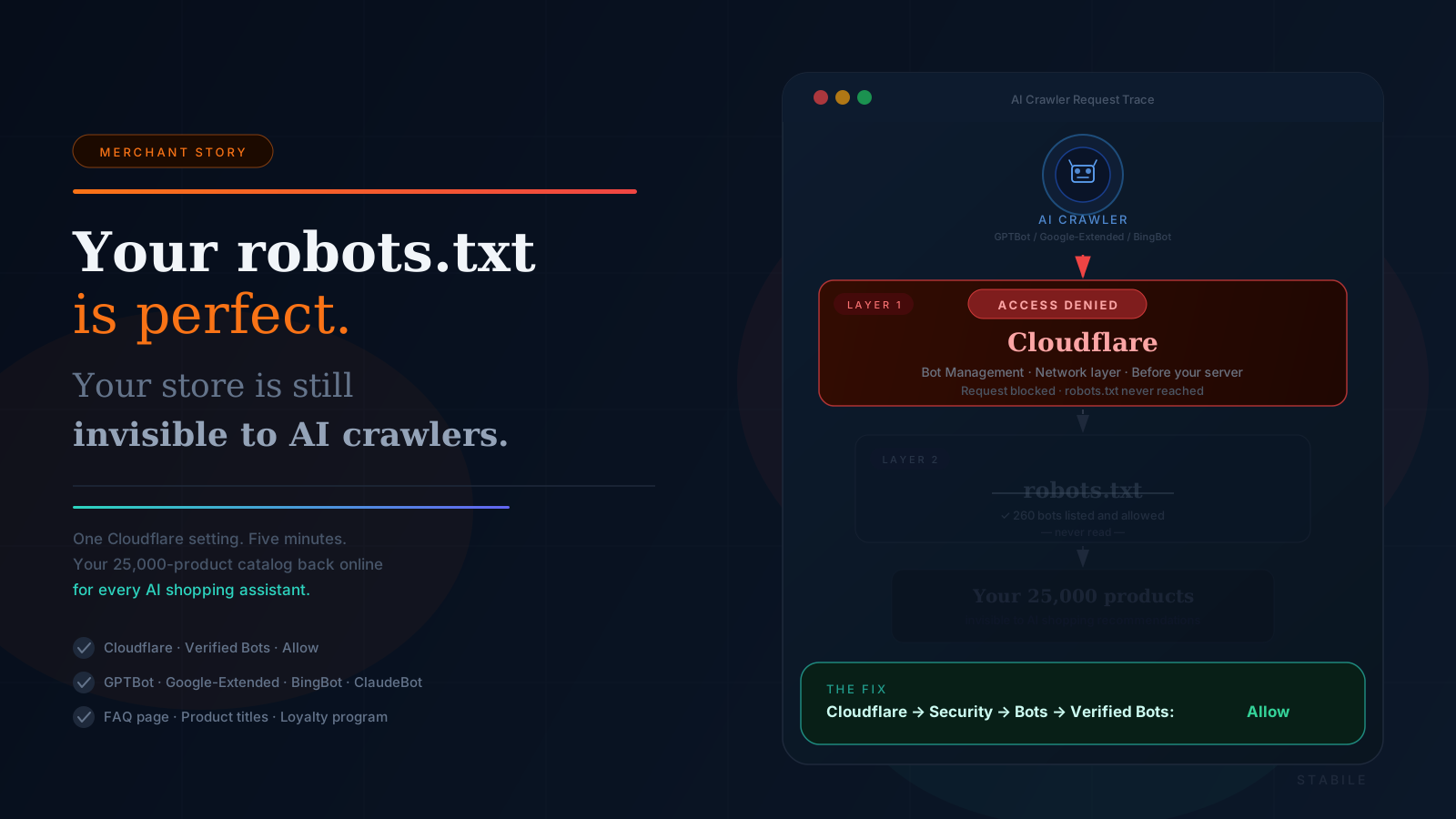
Direct Answer A properly configured robots.txt file does not prevent Cloudflare from blocking AI shopping crawlers. Cloudflare operates at the network layer — before your server, before robots.txt — and its default Bot Management settings frequently block GPTBot, Google-Extended, and BingBot with an "Access Denied" response. Robots.txt is only read after a crawler gets through that front door. To fix it: in your Cloudflare dashboard, go to Security → Bots and confirm that "Verified Bots" is set to Allow, not Block or Challenge.
A wholesale merchant recently replied to one of our support emails with a single line:
"What can I do to increase more sales?"
It's the most common question in e-commerce. But in 2026, the answer has changed. A growing share of purchase decisions now starts not with a Google search but with a question asked to an AI assistant — ChatGPT, Google AI Mode, Microsoft Copilot. Shoppers are asking "where can I buy a portable power bank under £20?" and buying from wherever the AI recommends.
So we did something most app founders don't do. We went and looked at the store.
What we found reveals a problem that is almost certainly affecting thousands of Shopify stores right now — stores that believe they are AI-ready, but are actually invisible to every AI shopping crawler on the internet.
The robots.txt Trap
When we told the merchant their store might be blocking AI crawlers, they pushed back immediately. They sent us their robots.txt file — a beautifully configured document explicitly allowing 260+ verified AI, LLM, search, and research bots. GPTBot. Google-Extended. ClaudeBot. BingBot. PerplexityBot. All listed. All allowed.
They were right to push back. Their robots.txt was perfect.
And it didn't matter.
Here's why.
The Two Layers Most Merchants Don't Know About
When an AI crawler visits your store, it has to pass through two completely separate systems before it can index a single product:
 AI Crawler visits your store
           │
           ▼
  ┌─────────────────────┐
  │     CLOUDFLARE      │  ← Layer 1 (the front door)
  │   Bot Management    │    Decides who gets in based
  │                     │    on request signatures
  └────────┬────────────┘
           │
      Allowed?  ──── No ──→  "Access Denied"
           │
          Yes
           │
           ▼
  ┌─────────────────────┐
  │    YOUR SERVER      │  ← Layer 2 (inside the building)
  │     robots.txt      │    Tells crawlers what to index
  │  ✓ 260 bots listed  │    — your setup here is perfect
  └────────┬────────────┘
           │
           ▼
    Your products
   (visible to crawler)
robots.txt is a file that sits on your server. It tells crawlers which pages they're allowed to index — but only once they're already inside your site.
Cloudflare (and similar CDN/firewall services) operates at the network layer, before your server, before robots.txt. It's the door before the door. When an AI crawler sends a programmatic HTTP request to your domain, Cloudflare inspects that request — the user agent, IP reputation, TLS fingerprint, behavioral signals — and decides whether to let it through or return "Access Denied."
When we simulated an AI crawler request to this merchant's store, Cloudflare blocked it before it ever reached a single product page. Their 25,000-product catalog — invisible.
The robots.txt never got read. It didn't matter how well-configured it was.
How to Check If Your Store Has This Problem
You can test this yourself. Visit your own store using a tool that makes programmatic HTTP requests — any basic curl command, API tester, or web scraping tool works. If you see your store, you're fine. If you see an "Access Denied" or a Cloudflare challenge page, AI crawlers are likely hitting the same wall.
To fix it:
- Log into your Cloudflare dashboard
- Go to Security → Bots
- Confirm "Verified Bots" is set to Allow — not Block or Challenge
- Go to Security → Events and filter recent blocked requests — look for GPTBot, Google-Extended, BingBot in the log
- If verified bots are being blocked or challenged, toggling that single setting opens the door to every major AI shopping crawler
Five More Things We Found on the Same Store
The crawler block was the biggest issue, but it wasn't the only one. Here's the rest of what a five-minute review surfaced — and every item on this list is common across Shopify stores:
1. A broken banner linking to a 404 page
The homepage had a prominent promotional tile that linked to a page that no longer existed. Shoppers who clicked landed on a dead end. More importantly, AI crawlers follow links and flag broken destinations as negative trust signals. Audit your homepage links regularly.
2. "Coming Soon" in the navigation
An unfinished feature was highlighted in the main navigation. Both visitors and AI crawlers read page content for signals of store quality. An incomplete feature front-and-centre signals an unfinished store.
3. Stale promotional content
A seasonal sale banner was still live months after the promotion ended. Outdated promotions erode credibility. AI systems that crawl your store read page content as trust signals — a sale that ended long ago tells a quiet but damaging story.
4. No FAQ or Q&A page
This is one of the most underused AI commerce tools available to any merchant. AI shopping assistants — ChatGPT, Copilot, Google AI Mode — routinely answer buyer questions like "does this store ship internationally?" or "what is the minimum order quantity?" by pulling from FAQ pages with structured schema markup.
A well-written FAQ page essentially pre-answers what AI systems need to recommend your store confidently. For a wholesale business, the questions write themselves: MOQ, shipping times, bulk discounts, how to apply as a reseller.
5. Product titles written for catalogues, not for conversations
With 25,000 products, this store has a significant advantage in AI commerce — a deep, specific catalog that AI assistants can match to a wide range of buyer queries. But AI search matches buyer questions to product titles.
"3m USB-C Fast Charging Cable for Samsung Android" will outperform "USB Cable 3m" every time.
For your top 20 sellers, rewrite titles to answer the question a buyer would actually ask.
The Loyalty Layer: Turning AI Referrals Into Repeat Revenue
Getting discovered by AI shopping assistants is step one. But if there's no reason for a buyer to come back, each AI referral is a one-time transaction.
This merchant had 10 AI-channel orders coming in every week — averaging £19.60 each, zero ad spend — with no loyalty program in place. No points. No rewards. No reason for those buyers to return. The AI was doing the hard work of acquisition, and the store was leaving the retention value completely on the table.
Loyalty programs purpose-built for AI commerce — where the reward offer travels inside the AI-assisted shopping session itself, visible to the buyer at the moment of decision — are the bridge between AI discovery and long-term customer value. One setup, compounding returns.
The Bigger Picture
This merchant did a lot of things right. 25,000 products. A professionally configured robots.txt. A clear wholesale value proposition. AI was already sending them orders every week.
But a single Cloudflare setting was quietly making all of it invisible to new AI shopping systems.
The shift to AI-assisted commerce is not coming — it is already here. Stores that show up in AI recommendations are gaining a channel that operates 24 hours a day, requires no ad spend, and compounds with every positive trust signal you build. Stores that are invisible to AI crawlers are being left out of conversations they don't even know are happening.
The checklist is short. The fixes are mostly free. The window to get ahead of competitors who haven't thought about this yet is still open — but it won't be forever.
Quick Checklist: Is Your Store AI-Ready?
- Cloudflare Verified Bots set to Allow
- No broken links on the homepage
- No stale promotions or "Coming Soon" navigation items
- FAQ page with structured schema markup
- Product titles written as buyer questions, not catalogue entries
- Loyalty program live and visible to AI shopping agents
Frequently Asked Questions
Does robots.txt stop AI crawlers from being blocked by Cloudflare? No. robots.txt is read by crawlers only after they have already accessed your server. Cloudflare operates at the network layer — before your server — and can block or challenge programmatic requests before robots.txt is ever seen. A well-configured robots.txt file has no effect on Cloudflare's bot management decisions.
Which AI shopping crawlers does Cloudflare block? Cloudflare's default Bot Management settings can block any bot that exhibits programmatic request patterns, including GPTBot (ChatGPT/OpenAI), Google-Extended (Google AI Mode), BingBot (Microsoft Copilot), ClaudeBot (Anthropic), and PerplexityBot. The blocked bots vary by your Cloudflare plan and configuration. Check Security → Events in your Cloudflare dashboard to see which bots have recently been denied.
How do I allow AI crawlers in Cloudflare? Go to Security → Bots in your Cloudflare dashboard and confirm "Verified Bots" is set to Allow. Cloudflare maintains a list of verified legitimate bots — including all major AI shopping crawlers — and this setting allows them through automatically, without requiring you to manage individual user agents.
Can I have Cloudflare protection and still be visible to AI crawlers? Yes. Allowing verified bots does not open your store to malicious traffic. Cloudflare's verified bot list contains only legitimate, identified services — search engines, AI shopping crawlers, monitoring tools. Allowing them is safe and is standard practice for any store that wants organic and AI-driven discoverability.
What is the difference between robots.txt and Cloudflare bot settings? robots.txt is an instruction file on your web server that tells crawlers which pages to index — it's honored voluntarily by reputable bots. Cloudflare is a network-layer firewall that decides, based on request characteristics, whether a bot gets access at all. The two are completely independent. robots.txt cannot override a Cloudflare block, and Cloudflare cannot read your robots.txt.
Why is a FAQ page important for AI commerce? AI shopping assistants like ChatGPT, Copilot, and Google AI Mode pull structured answers directly from FAQ pages when buyers ask questions about your store. Questions like "does this store ship internationally?" or "what's the minimum order?" are answered by AI using your FAQ content — with structured schema markup, this happens reliably. A well-built FAQ page is essentially a pre-written brief you hand to every AI that considers recommending you.
Get started
Loyalty autopilot for AI-referred shoppers. Stabile tracks orders from ChatGPT, Google Gemini, and Microsoft Copilot, auto-rewards returning AI shoppers, and reports revenue by AI channel — with a 5-minute setup and no disruption to your existing store.
Two plans to choose from:
- Free to install — pay on results only: 1% of reward value redeemed + $0.05 per AI-channel transaction. No upfront cost, no charge if no rewards are applied.
- Loyalty Copilot — $5.99/month (or $59.99/year, saving 17%) with a 30-day free trial. Flat-rate access to all features including Gemini tracking, PayPal integration, and revenue insights by AI platform.